On-Screen EKG Measurement with Cardio Calipers

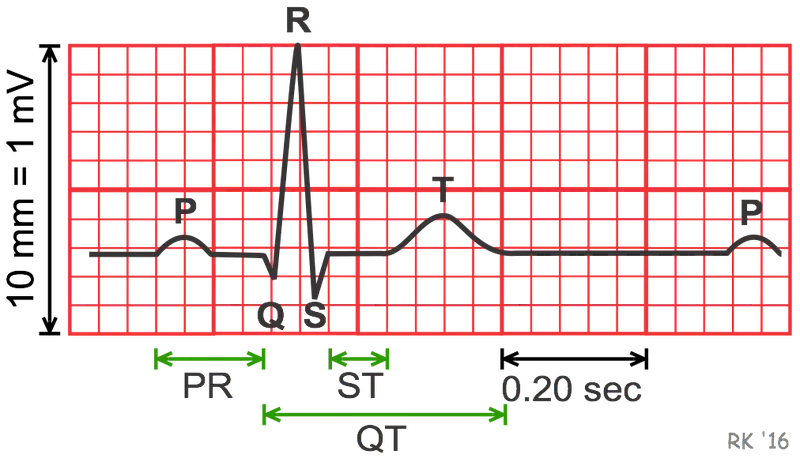
Open the EKG in any image viewer or PDF. Drag Cardio Calipers over the PR interval, QRS complex, or QT segment. Calibrate to 20 mm on the paper grid, then switch to milliseconds or beats per minute.

Our unique transparent Windows app floats above other software, allowing you to measure EKGs anywhere

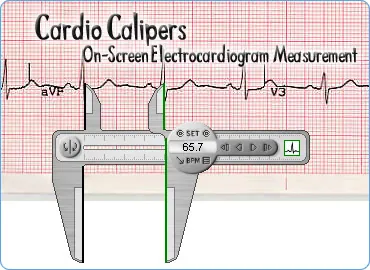
The Cardio Calipers allow measurement of any EKG, no matter what format the EKG image is in.
Simply open up your EKG in any image viewer application and move the Cardio Calipers into place with the mouse.
Download for free, and purchase the full featured version for just $49.50, we offer a risk free 30 day money back guarantee
Accurate and Simple to use
Manipulating the application is simply accomplished through use of the mouse, and a variety of keyboard controls allow for extra fine alignment. The Calipers can be aligned to measure an entire EKG complex, QT interval, PR interval, and QRS duration.
The Cardio Calipers can be used with any program as they float over other applications allowing quick and easy measurements. Read the full specs on how everything works.


Discover the many uses of your Cardio Calipers


How to use Cardio Calipers
Short answers for the usual questions. The full manual, including keyboard shortcuts, is on getting started .